
Checkout
On this page, we'll dive into the checkout endpoint you can use to create hosted checkout links for your customers. Creating a checkout is a single API call — the payment itself is a deposit, so you track it with the deposit endpoints you already use. Please contact our support admin@wepay.to to integrate checkout.
Example Screenshot
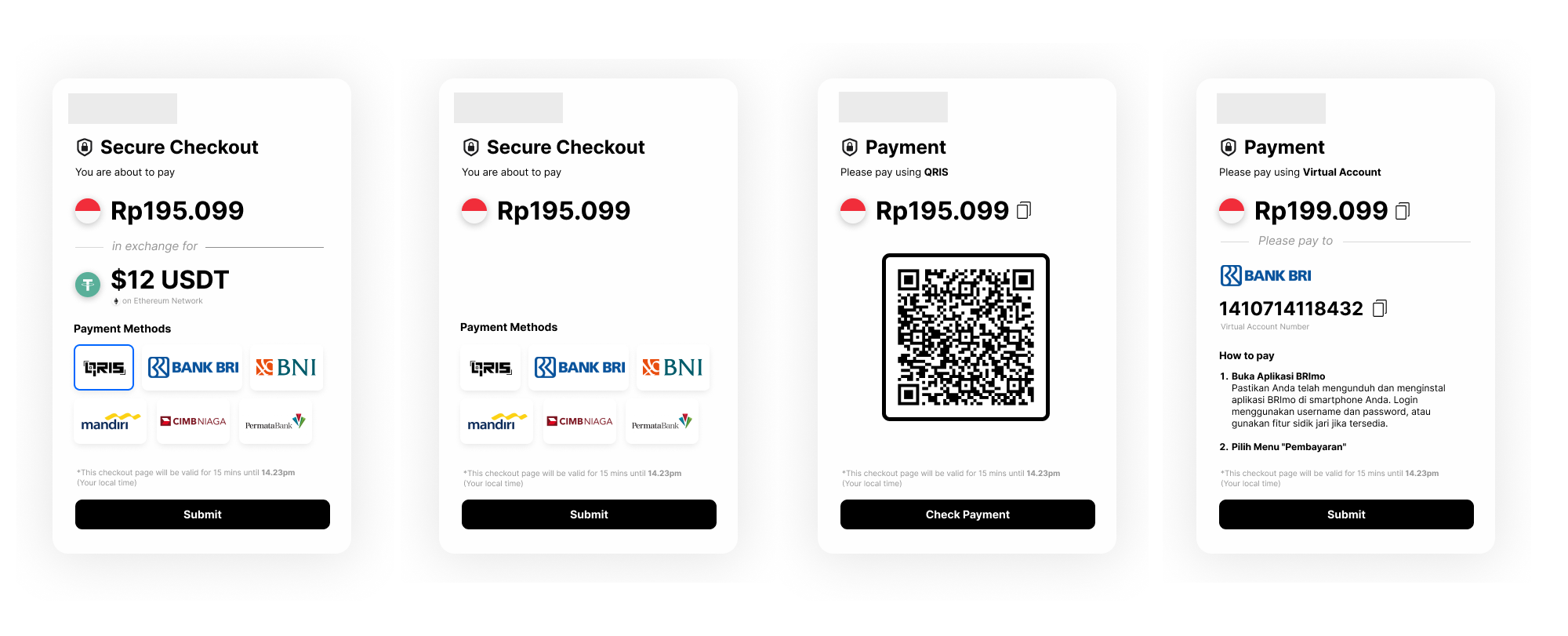
How checkout works
A checkout is a hosted payment page wrapped around a deposit. The full flow is:
- You call
POST /v1/checkoutwith the currency and amount. You get back anidand aurl. - You redirect your customer to that
url. The page is valid for 15 minutes from creation. - Your customer picks a payment method on the page. At that moment a deposit is created with
depositIdequal to the checkoutid. - Your customer pays. The deposit moves to
completedand a deposit webhook is sent to you. - You track the payment with the deposit endpoints, using the same
id.
The id returned by POST /v1/checkout is the depositId of the deposit your customer creates. A checkout can produce at most one deposit, so this single id is your handle for the whole flow — use it with GET /v1/deposit/fiat/{id} and match it against the orderId in your deposit webhook.
POST /v1/checkout is the only checkout endpoint available to you. The hosted page talks to internal endpoints of its own that are not part of the public API.
Create Checkout
This endpoint creates a hosted checkout page for your customer to pay for their order.
Required attributes
| Field | Type | Description |
|---|---|---|
inputCurrency | string | The currency your customer pays in (e.g., |
inputAmount | float | The amount your customer pays, in |
outputAmount | float | The amount you want to receive, in |
Optional attributes
| Field | Type | Description |
|---|---|---|
outputCurrency | string | The currency you want to receive (e.g., |
Read the statusCode field in the response body rather than the HTTP status code.
The amount must fall inside the minimum and maximum of at least one of your enabled deposit payment methods, otherwise the request fails with 400.
A crypto outputCurrency also requires conversion to be enabled for that currency pair on your account. Contact admin@wepay.to to enable it.
Request
curl --location \
https://staging.wepay.to/v1/checkout \
--header 'Content-Type: application/json' \
--header 'X-Signature: YOUR_SIGNATURE' \
--header 'X-Timestamp: YOUR_TIMESTAMP' \
--header 'X-Client-ID: YOUR_CLIENT_ID' \
--data '{
    "inputCurrency" : "IDR",
    "outputCurrency" : "usdt-tron",
    "outputAmount": 1
}'
Response
{
  "data": {
    "id": "0f9a1c2e-4b7d-4f3a-9c8e-2d5b6a7c8d90",
    "url": "https://checkout.wepay.to/checkout/0f9a1c2e-4b7d-4f3a-9c8e-2d5b6a7c8d90"
  },
  "message": "Successfully created checkout",
  "statusCode": 200
}
Response attributes
| Field | Type | Description |
|---|---|---|
id | string | The checkout id. This is also the |
url | string | The hosted checkout page. Redirect your customer here — always use the |
HTTP Status 400 Example
Error Response
{
    "statusCode": 400,
    "error": "Bad Request",
    "message": "Checkout is not enabled"
}
Track the payment
Because the checkout id is the depositId, you track a checkout with the regular deposit tooling.
Webhook (recommended)
Register your deposit webhook in the dashboard at https://dashboard.wepay.to — see Webhook. Every checkout payment sends a deposit webhook whose orderId is the checkout id, so you can match it straight back to your order. No checkout-specific setup is needed.
Polling
If you also need to poll, call GET /v1/deposit/fiat/:depositIdOrReference with the checkout id. The response is the standard deposit model, including status and the payment instructions your customer was shown.
The deposit does not exist until your customer picks a payment method on the hosted page. Until then, GET /v1/deposit/fiat/{id} returns 404.
If your customer never picks one, no deposit is ever created and no webhook is ever sent — the id keeps returning 404. Treat a 404 more than 15 minutes after creating the checkout as an abandoned checkout.
Request
curl -X GET 'https://staging.wepay.to/v1/deposit/fiat/0f9a1c2e-4b7d-4f3a-9c8e-2d5b6a7c8d90' \
--header 'X-Signature: YOUR_SIGNATURE' \
--header 'X-Timestamp: YOUR_TIMESTAMP' \
--header 'X-Client-ID: YOUR_CLIENT_ID'
Response
    {
      "data": {
        "depositId": "0f9a1c2e-4b7d-4f3a-9c8e-2d5b6a7c8d90",
        "depositType": "fiat",
        "userId": "64b514f4358de",
        "inputCurrency": "IDR",
        "inputAmount": 16578,
        "outputCurrency": "usdt-tron",
        "outputAmount": 16413,
        "fee": {
          "amount": 165,
          "percentage": 1,
          "currency": "usdt-tron"
        },
        "paymentFiat": {
          "bankCode": "qris",
          "bankName": "qris",
          "qrData": "xxx"
        },
        "paymentCrypto": {},
        "status": "pending",
        "activityHistory": [
          {
          "activity": "Paid by Payee",
          "description": "Waiting for payment",
          "status": "pending",
          "updatedAt": "2025-06-14T07:20:35.467Z"
          }
        ],
        "exchangeInfo": {
          "exchangeRate": 16412.65060240964,
          "outputCurrency": "usdt-tron",
          "outputAmount": 16413
        },
        "createdAt": "2025-06-14T07:20:35.467Z",
        "updatedAt": "2025-06-14T07:20:35.467Z",
        "expiredAt": "2025-06-14T07:35:34.63Z"
      },
      "message": "getDepositDetailHandler successfully",
      "statusCode": 200
    }
Response before payment method is chosen
    {
      "statusCode": 404,
      "error": "Not Found",
      "message": "Deposit not found"
    }
Sandbox testing
To simulate a paid checkout on sandbox, force the underlying deposit to completed with PATCH /v1/deposit/:depositId, passing the checkout id. This also sends the deposit webhook, so you can test your whole integration end to end.
Works only on the sandbox environment.
Your customer must have picked a payment method on the hosted page first — otherwise there is no deposit to update and the call returns 400.
Required attributes
| Field | Type | Description |
|---|---|---|
status | string | The status to move the deposit to, e.g. |
Request
curl --location --request PATCH 'https://staging.wepay.to/v1/deposit/0f9a1c2e-4b7d-4f3a-9c8e-2d5b6a7c8d90' \
--header 'Content-Type: application/json' \
--header 'X-Signature: YOUR_SIGNATURE' \
--header 'X-Timestamp: YOUR_TIMESTAMP' \
--header 'X-Client-ID: YOUR_CLIENT_ID' \
--data '{
    "status" : "completed"
}'
Response
  {
    "statusCode": 200,
    "message": "Deposit updated",
    "data": {
      "depositId": "0f9a1c2e-4b7d-4f3a-9c8e-2d5b6a7c8d90",
      "depositType": "fiat",
      "userId": "64b514f4358de",
      "inputCurrency": "IDR",
      "inputAmount": 16578,
      "outputCurrency": "usdt-tron",
      "outputAmount": 16413,
      "fee": {
        "amount": 165,
        "percentage": 1,
        "currency": "usdt-tron"
      },
      "paymentFiat": {
        "bankCode": "qris",
        "bankName": "qris",
        "qrData": "xxx"
      },
      "paymentCrypto": {},
      "status": "completed",
      "activityHistory": [
        {
        "activity": "Paid by Payee",
        "description": "Waiting for payment",
        "status": "pending",
        "updatedAt": "2025-06-14T07:20:35.467Z"
        }
      ],
      "exchangeInfo": {
        "exchangeRate": 16412.65060240964,
        "outputCurrency": "usdt-tron",
        "outputAmount": 16413
      },
      "createdAt": "2025-06-14T07:20:35.467Z",
      "updatedAt": "2025-06-14T07:22:11.104Z",
      "expiredAt": "2025-06-14T07:35:34.63Z"
    }
  }